Why We Left WordPress: How Our Elementor Agency Adapted to the AI Era
Over the past year, I've personally struggled with what to do about WordPress. Every new leap in AI made WordPress a little less necessary, and the sales for WordPress just weren't coming in.
According to W3Techs, for the first time in its 23-year history, WordPress is steadily losing market share. Proxy was no exception as we saw some really great clients move on to other, more AI focused platforms. As a WordPress developer, I felt about as useful as a cab driver in a town full of Waymos.
Add this to the fact WordPress and Elementor are not keeping up with the market''s demand for speed and security, and a support ticket that proved it wasn't just unlikely, but impossible.
So we made the call. Proxy is officially moving away from WordPress and Elementor for all new builds. Here's why we left, what we switched to, and why I think a lot of businesses are about to follow.
Elementor helped launch Proxy
Proxy really kicked off back in 2020, when Elementor named us one of their Sites of the Month, a super motivating community showcase they ran until 2022. They were intrigued by the idea of an Elementor-focused agency, which was new in those days. Ben Pines, Elementor's former CMO, even reached out about a possible content collaboration. We weren't camera ready at that time (still might not be!), so it never panned out, but it was a thrill just to be asked.
I bring all this up to say: if we'd stayed on the Elementor path and built our new website on version 4.0, we just might have gotten their attention (and exposure) again. Yet, even that wasn't enough of a perk to keep us on Elementor.
The speed never came
Over the years, we waited for performance improvements that either never showed up or, when they did, were nothing to write home about. Version 4.0 was no exception. Elementor rolled it out this spring, promising "cleaner output and improved Core Web Vitals," but never published a single benchmark to back that up.
The security never came either
Most WordPress site owners have no idea how often their site is under attack. When Cloudflare studied login traffic across its network, it found that 76% of login attempts on WordPress sites using leaked passwords were successful.
Plugins are a ridiculous idea, and they never should have become a thing. Installing a plugin is like downloading a torrent: it can act as a backdoor for attackers all on its own. In 2025, researchers found 91% of WordPress vulnerabilities were from plugins.
Not only that, but as developers, we needed a crystal ball to tell us whether a plugin's author will keep maintaining their plugins or let each day bring that WordPress site closer to an attack. If a plugin author stops updating for any reason (out of business, just didn't feel like it, etc), that site is now a sitting duck. In 2024 alone, 1,614 plugins and themes were pulled from the WordPress directory over security holes nobody patched.
And sometimes the hole isn't even in a plugin. Just a week prior to writing this, PHP, the language every WordPress site runs on, shipped emergency fixes for two critical flaws nicknamed "PHP2Shell." They let an attacker take over the server a website lives on, no password needed. Several major global companies, high-profile platforms, and some national governments preemptively took down their websites, restricted operations, or entered extended emergency maintenance mode.
Bottom line, if you're staying on WordPress, maintenance is not optional, it's critical. This constant war of maintenance could be totally eliminated if we switched to a static option like plain html or this new "Astro" framework that is supposed to help developers create shared components and templates similar to a WordPress build's structure.
The support ticket that broke the camel's back
Then came the support ticket. One of our SaaS clients was getting flagged by SecurityScorecard, the rating services big companies use to vet vendors before they sign. Their WordPress site was stuck at a B, which doesn't sound terrible, but that one letter was costing our client real contracts as Enterprise clients passed them over due to this score.
We fixed everything that could be fixed, but WordPress and Elementor require two exceptions the scanners flag ("unsafe-inline" and "unsafe-eval") require just to function, and WordPress can't support a protection called Subresource Integrity at all. Any attempt to address these issues, broke both the site's layout on the front end, and completely froze the Elementor editor for our client.
The only way to an A was to rip out Elementor and give up visual editing... so we needed to rebuild their site on something else pronto.
WordPress couldn't get us enterprise-ready
We just could not find a way to make a WordPress site enterprise-ready. Before a big company signs with a vendor, its procurement team wants to see:
- A SOC 2 Type 2 report from an outside auditor, covering the last 12 months
- A recent penetration test (a report from hackers you hired to break in)
- A long security questionnaire (the industry-standard SIG has 855 questions, and the "Lite" version still has 126)
- A data processing agreement for privacy laws like GDPR
- Proof of cyber insurance
- Business continuity and disaster recovery plans
- Single sign-on, multi-factor authentication, and audit logs
- An accessibility report (a VPAT) showing you meet WCAG standards
And before anyone reads any of that, your website has to pass their automated security scan. That's exactly where WordPress let us down.
On top of that, I was looking down the barrel of a $20,00-$150,000 bill to get Proxy SOC 2 Type 2 verified. Was I really going to bet the equivalent of a small country's GDP that we could even get there with WordPress builds? No. No, I was not.
Then I started vibe coding
Ever since I started coding with AI, I just can't force myself to use Elementor anymore, no matter how hard I try. It had its strong suits, but the editor always found a new way to frustrate me.
The last time a client asked for WordPress, I ended up coding the site with AI and then exporting to WordPress as a final launch step. As it turns out, converting an html site to Elementor is much simpler than doing it the other way around! (more on what goes into converting Elementor to Astro later)
After all was said and done, the Elementor version of the site was noticeably slower to use and a little janky.
See our early tests comparing Astro to Elementor
What we switched to
| Before | Now | |
|---|---|---|
| CMS | Elementor | Proxy CMS, built in-house (or Cloudflare's EmDash, for clients who want a more established name) |
| Codebase | WordPress (PHP) | The Astro framework (lean HTML, CSS, and JavaScript) |
| Hosting | xCloud servers | Cloudflare's global edge network |
| Plugins and extra features | The WordPress plugin library | Cloudflare's own tools, or features we build ourselves |
What it did for our own site
Before we moved our own site, we rebuilt madebyproxy.com in Astro with the same design, the same copy, and the same structure, then measured both versions with Google PageSpeed Insights:
| madebyproxy.com homepage | WordPress + Elementor | Astro |
|---|---|---|
| Performance score, mobile | 65 | 99 |
| Main content on screen (LCP) | 9.9s | 2.1s |
| First content on screen (FCP) | 3.5s | 1.2s |
| Page fully drawn (Speed Index) | 4.7s | 1.2s |
| Time the page froze while loading | 123ms | 0ms |
| Page weight | 5.7 MB | 1.0 MB |
| HTML elements on the page | 684 | 215 |
Page-builder boxes (<div>s) | 382 | 34 |
| Elementor code in the page | 1,199 mentions | None |
Same design, same content. Google PageSpeed Insights, mobile, median of 7 to 9 runs, September 25, 2026.
382 boxes became 34, and nothing left the page. All that nesting was there for Elementor's drag handles, not for your visitors.
What Will be Left for Web Designers?
Even a third grader can generate a halfway decent brochure style site with AI in 2026,. However, most modern websites blur the line between site and app. It's not enough to have a collection of 5+ pages silently hoping to make sale. If you're going to make a site today, you'd better bring it. As one of my team mate's said:, "In 2020 clients were seeking out design. Now, they need sales."
Plus, it helps to begin expanding into apps. Where websites were in 2020 is where apps are today. Anyone can technically make one, but few have the patience, dedication, and skill.
So we built our own apps: Proxy CMS + the Proxy Portal create a dashboard full of tools our clients use to run their Astro sites on Cloudflare. It was actually client of mine who turned me on to everything you can do with Claude and Cloudflare these days. (Thank you, RJ. You rock, man!)
For example, the new madebyproxy.com might look the same, but it's packed with app-ish features like the complex customer ordering form and a host of automations that eliminate tedious sales and onboarding taks.
The great migration
I truly think we're at the beginning of a great migration away from WordPress. Businesses are skipping Webflow, Framer, and the other out-of-the-box builders and going straight for a custom code and hosting stack that used to be reserved for enterprise companies. The best part? AI is helping us zoom through the work that used to make those builds START at $50k. Now you can get the same kind of site starting at just $2500.
But what about editing?
For years, we thought slow page speed scores were a necessary trade-off for easy editing. Well, not anymore.
There are all kinds of ways to edit a site now:
- Straight through an AI like Claude
- A CMS like Payload (which we considered) or TinaCMS
- Claude Design, Anthropic's new tool for designs and prototypes
- Even EmDash, Cloudflare's new CMS, which launched April 1, 2026, and hit version 1.0 in September
I tried my hand at all of them, and while each one had its cons, I never once felt myself drifting back toward drag and drop. The page builder's one real advantage was that a non-developer could move a box. Now you can just ask.
Meet Proxy CMS and BERT AI
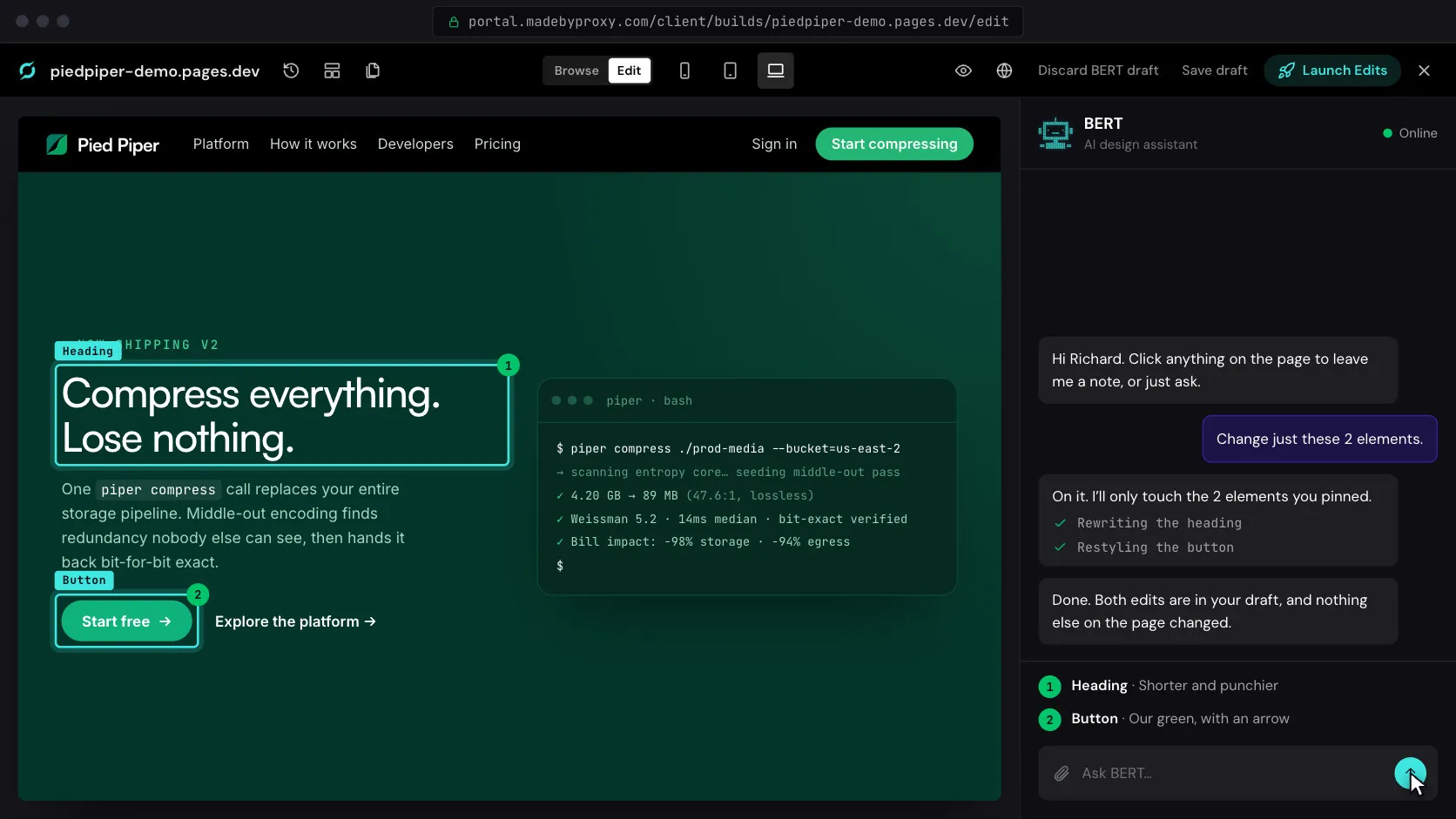
Introducing Proxy CMS. Recently launched, it's already working great for client changes. Simply click on any image or text to change it, and it goes live in about a minute. That part isn't unusual. This is where it gets interesting. The layout is handled by BERT AI, our own AI design assistant, who's constantly being trained on Proxy's own design playbooks. BERT is already like an experienced member of the team. BERT can now provide the same level of human design assistance we've always offered, but he can do it 24/7.
Simply describe your change in plain Englisht to BERT, and sit back as he edits the real code, builds it, and shows you a preview before anything goes live. Every version is saved, and one click rolls it back.
"What if you guys died tomorrow?"
A client once asked us, "Well, what if you guys died tomorrow?" (We like you too!) A bit grim, but fair question, we actually have a good answer. If you ever want to move off our platform, your site can easily be converted to work with EmDash, Cloudflare's new CMS. It's still new, but Cloudflare plans to keep growing it (it even moved its own blog onto EmDash in August), and it's designed specifically for Astro sites. And because Astro is free and open source, your site is standard code you own, so any developer can pick it up.
Btw, We Build Apps now
WYSIWYG editors made web design accessible to way more people, and AI is doing the same for app development. Before AI, building an app was crazy tedious. One unlucky teammate spent months painstakingly building out every possible state of one app's UI components in Figma. Just after he finished, Figma released Figma Make, which does in moments what he'd just spent months doing. 🤦♂️
We've hired and worked with some great full stack developers over the years, but it ended up costing a literal fortune. Now we can turn our LLM's loose on the same work and get it back in days, not months. If you've ever had an app idea you wanted to see become a reality, now is the time to make your app a reality.
A final note on AI.
A lot of people believe AI is taking away creative opportunities, but I look at it the other way around.
Historically, only the wealthy and those with funds were immortalized in paintings. Then, photography came around and all of a sudden the poor could afford self portraits. They could afford their own visual records. The funny thing is everyone thought painting would no longer be a profession, but now painters are paid for their art and not just conscripted by the rich to make only what the rich want.
For the past 100 years or so, only the really wealthy could afford to make a major motion picture, but now you could technically crank one out with a staff of one. And maybe, just like painting, digital artists will once again do so only for the love of the craft. When everything becomes more accessible, those with talent and a genuine passion will still shine through, just like the painters of today.
I say AI doesn't stifle creativity, it breeds it. Why? Because anyone that is a decent wordsmith, but terrible at drawing can now share their vision with the world. A guy that is already is an expert illustrator, but needs a bit of help animating, can now make his own animated series without hiring a whole overseas animation team like they did in the past. More importantly, designers can now code their visions with the skills of a full stack developer.
Coding is less of a talent and more of a language, and AI is the translator. As a designer, what I lack in hand coding ability, I can now make up for in writing ability. As long as I convey my design vision and UX ideas accurately (or repeatedly) enough to an LLM, I can see my vision come to life.
At the very least, AI is a net positive for creativity simply because it's eliminated the creative differences problem; almost as much as this guy.
With AI, we no longer need to play every instrument to write a symphony. Each one of us is now a composer.
Keep the web beautiful.
- Devin